
Remove Nth Node From End of List


Given the head of a linked list, remove the nth node from the end of the list and return its head.


Example 1:
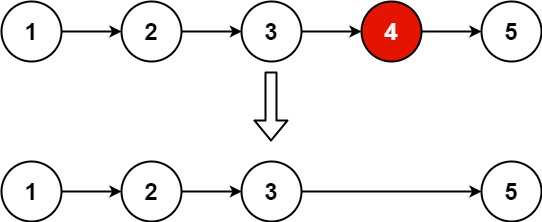
Input: head = [1,2,3,4,5], n = 2
Output: [1,2,3,5]

Example 2:

Input: head = [1], n = 1
Output: []

Example 3:

Input: head = [1,2], n = 1
Output: [1]


Constraints:

  • The number of nodes in the list is sz.
  • 1 <= sz <= 30
  • 0 <= Node.val <= 100
  • 1 <= n <= sz


Follow up: Could you do this in one pass?


Solution:


/**
* Definition for singly-linked list.
* public class ListNode {
* int val;
* ListNode next;
* ListNode() {}
* ListNode(int val) { this.val = val; }
* ListNode(int val, ListNode next) { this.val = val; this.next = next; }
* }
*/
class Solution {
public ListNode removeNthFromEnd(ListNode head, int n) {
ListNode fast = head;
ListNode slow = head;

for(int i = 0; i < n; i++){
fast = fast.next;
}
if(fast == null) return head.next;
while(fast.next != null){
fast = fast.next;
slow = slow.next;
}

slow.next = slow.next.next;

return head;
}
}

Comments

Popular posts from this blog

Run a Local LLM with Ollama and Use Apple Shortcut Automations to Auto-Reply to Messages

Apple’s Shortcut Automations allow your iPhone or Mac to react to events like receiving a message . By combining this with a locally hosted LLM (via Ollama) , you can build a private AI auto-reply system that runs entirely on your local network. In this guide, we’ll configure: A local LLM using Ollama A message-triggered Shortcut Automation Sender-based filtering Automatic AI-generated replies (within Apple’s security limits) 1. Why Use Shortcut Automations Instead of Manual Shortcuts? Automations let Shortcuts run automatically when an event occurs. Examples: When a message is received When a specific person messages you When you arrive at a location At a specific time For AI auto-replies, message-based automations are ideal. 2. Install and Run a Local LLM with Ollama Install Ollama: brew install ollama Start the server (default port): ollama serve Verify installation: ollama list 3. Pull a Lightweight Model For message replies, small models work best: ollama pull tinyllama Or for b...

How to Setup Virtual Environment in Python with venv

A virtual environment is the most used tool by the developers to isolate the dependencies for different projects. Suppose you have two projects say porj1 and proj2 . proj1 needs the Django dependency with version 3.2 but your proj2 needs the Django dependency with version 2.2. In this situation you need a virtual environment to keep the both version on your system separately.  How to create virtual environment in python:  Decide a directory where you want to create the virtual environment. You can use your project directory or any other directory as per your wish.  Run the below command. Here` awesome_proj_env ` is the folder where virtual environment will be created. if the folder does not exists then it will be created automatically. python3 -m venv awesome_proj_env    Activate the virtual environment: On Linux/Mac OSX: source awesome_proj_env/bin/activate  On Windows: awesome_proj_env \Scripts\activate.bat Deactivate the virtual environment in Pyth...

LeetCode: Product of Array Except Self

Given an integer array  nums , return  an array   answer   such that   answer[i]   is equal to the product of all the elements of   nums   except   nums[i] . The product of any prefix or suffix of  nums  is  guaranteed  to fit in a  32-bit  integer. You must write an algorithm that runs in  O(n)  time and without using the division operation.   Example 1: Input: nums = [1,2,3,4] Output: [24,12,8,6] Example 2: Input: nums = [-1,1,0,-3,3] Output: [0,0,9,0,0]   Constraints: 2 <= nums.length <= 10 5 -30 <= nums[i] <= 30 The product of any prefix or suffix of  nums  is  guaranteed  to fit in a  32-bit  integer. Solution: class Solution { public int [] productExceptSelf ( int [] nums ) { int [] pr = new int [ nums . length ]; int [] sf = new int [ nums . length ]; int [] res = new int [ nums . length ]; int prc = 0 ;...